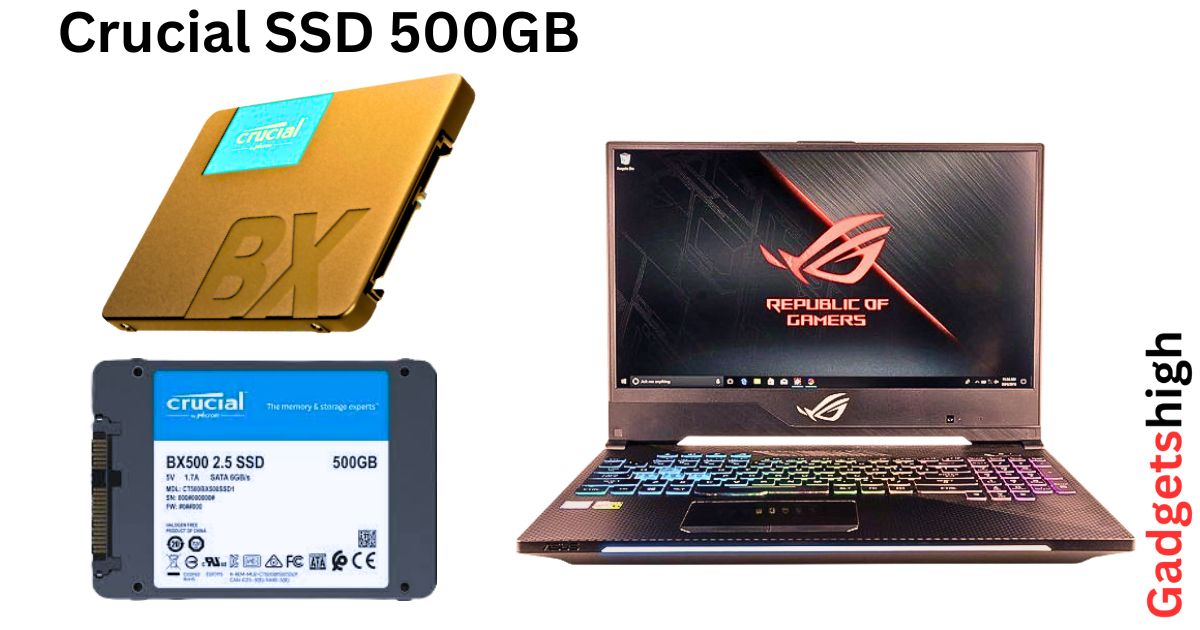
Crucial SSDs: 240GB/500GB/1TB, 6x faster than HDDs! Increase the power of NAND flash memory data at the best price & Full Specs in India 2026
Crucial BX500 vs MX500 SSD: 240GB / 500GB / 1TB — Price, Review, Specs
Why Your Old Hard Drive Is Holding You Back
If you’ve ever stared at a spinning circle for two minutes just to open a folder, or watched your laptop take longer to boot than it takes to brew a cup of tea, you already know the frustration. Hard drives are mechanical they have spinning platters and a tiny read arm that literally has to travel across a disk to fetch your data. That’s inherently slow, and no amount of extra RAM or a faster processor will fix it.
SSDs solve this completely. There are no moving parts just flash chips that respond to a read or write request almost instantly. The difference, when you first experience it, feels almost unfair. Boot in under 15 seconds. Programs that used to take 30 seconds to load now open before you’ve finished clicking the icon.

“After two years of daily use, my BX500 still shows 100% health in CrystalDiskInfo. No slowdown, no errors just the same speed as day one. Verified Amazon India customer, 2026
At Gadgets High, we’ve been covering storage upgrades for years, and Crucial the consumer arm of Micron, one of the world’s largest memory chip manufacturers consistently comes up as one of the most reliable and value-for-money choices in the Indian market. Today, we’re going deep on their two most popular SATA SSD lines: the entry-level BX500 and the mid-premium MX500.
2026 Prices in India — At a Glance
| Model | Capacity | 2026 Price (India) | Warranty |
|---|---|---|---|
| BX500 | 240 GB | Rs. 3890 – Rs. 6100 | 3 Years |
| BX500 | 500 GB | Rs. 8570 | 3 Years |
| BX500 | 1 TB | Rs. 13770 | 3 Years |
| MX500 | 500 GB | Rs. 5200 – Rs. 8100 | 5 Years |
| MX500 | 1 TB | Rs. 8946 – Rs. 11500 | 5 Years |
Prices fluctuate daily. Always verify on Amazon.in and Flipkart before purchasing.
BX500 vs MX500 — What Actually Separates Them?
Both drives use Micron’s 3D NAND flash memory, both come in a standard 2.5-inch SATA form factor, and both will make your system feel dramatically faster compared to a mechanical hard drive. But they’re not identical, and the differences matter depending on how you use your machine.

DRAM Cache — The Hidden Performance Factor
This is the biggest under-the-hood difference. The MX500 includes a dedicated DRAM cache chip on the drive itself. Think of it as short-term memory that the SSD uses to store frequently accessed data and file allocation tables. The result: the MX500 handles sustained, heavy workloads more gracefully large file transfers, video editing timelines, and database access patterns.
The BX500 is DRAM-less. It’s still fast easily 5–6x faster than any mechanical hard drive but during prolonged heavy reads or writes, it can slow down slightly compared to its DRAM-equipped sibling. For everyday computing, web browsing, Office applications, and even gaming, most users simply won’t notice this difference.
Endurance (TBW)
Total Bytes Written (TBW) tells you how much data can be written to the drive over its lifetime before performance might degrade. The MX500 wins here clearly especially in the larger capacities. The 1TB MX500 is rated for 360 TBW, giving it a significant long-term advantage for heavy users.
Warranty
BX500 gets you 3 years. MX500 comes with a 5-year limited warranty. If you’re installing this in a workstation or a machine you plan to use heavily for years, those extra two years of coverage are genuinely meaningful.
Gadgets High Quick Take: If you’re upgrading an older laptop for everyday tasks browsing, documents, video calls go BX500. If you’re building a workstation, doing creative work, or want maximum peace of mind, invest in the MX500.
Full Specifications
Crucial BX500 — Complete Specs
| Specification | BX500 240GB | BX500 500GB | BX500 1TB |
|---|---|---|---|
| Part Number | CT240BX500SSD1 | CT500BX500SSD1 | CT1000BX500SSD1 |
| Form Factor | 2.5-inch, 7mm | 2.5-inch, 7mm | 2.5-inch, 7mm |
| Interface | SATA III 6 Gb/s | SATA III 6 Gb/s | SATA III 6 Gb/s |
| NAND Type | Micron 3D NAND TLC | Micron 3D NAND TLC | Micron 3D NAND TLC |
| DRAM Cache | None | None | None |
| Sequential Read | 540 MB/s | 550 MB/s | 540 MB/s |
| Sequential Write | 500 MB/s | 500 MB/s | 500 MB/s |
| TBW | 80 TBW | 120 TBW | 220 TBW |
| MTTF | 1.5 million hours | 1.5 million hours | 1.5 million hours |
| Operating Temp | 0°C – 70°C | 0°C – 70°C | 0°C – 70°C |
| Dimensions | 100 × 69.9 × 7mm | 100 × 69.9 × 7mm | 100 × 69.9 × 7mm |
| Encryption | None | None | None |
| Warranty | 3 Years | 3 Years | 3 Years |
| Bundled Software | Acronis True Image | Acronis True Image | Acronis True Image |
| 2026 India Price | Rs. 3890 – Rs. 6,100 | Rs. 8570 | Rs. 13770 |
Crucial MX500 — Complete Specs
| Specification | MX500 500GB | MX500 1TB |
|---|---|---|
| Part Number | CT500MX500SSD1 | CT1000MX500SSD1 |
| Form Factor | 2.5-inch, 7mm | 2.5-inch, 7mm |
| Interface | SATA III 6 Gb/s | SATA III 6 Gb/s |
| NAND Type | Micron 3D NAND TLC | Micron 3D NAND TLC |
| DRAM Cache | 250MB LPDDR3 | 512MB LPDDR3 |
| Sequential Read | 560 MB/s | 560 MB/s |
| Sequential Write | 510 MB/s | 510 MB/s |
| Random Read (4K) | 95,000 IOPS | 95,000 IOPS |
| Random Write (4K) | 90,000 IOPS | 90,000 IOPS |
| TBW | 180 TBW | 360 TBW |
| MTTF | 2 million hours | 2 million hours |
| Encryption | AES 256-bit | AES 256-bit |
| Power Loss Immunity | Yes | Yes |
| Warranty | 5 Years | 5 Years |
| Bundled Software | Acronis True Image | Acronis True Image |
| 2026 India Price | Rs. 5200 – Rs. 8100 | Rs. 8946 – Rs. 11500 |
Side-by-Side Comparison — BX500 vs MX500
| Feature | BX500 (500GB / 1TB) | MX500 (500GB / 1TB) |
|---|---|---|
| Price 500GB | Rs. 8570 | Rs. 5200 – Rs. 8100 |
| Price 1TB | Rs. 13770 | Rs. 8946 – Rs. 11500 |
| Sequential Read | 550 MB/s | 560 MB/s |
| Sequential Write | 500 MB/s | 510 MB/s |
| Random 4K Read | ~70,000 IOPS | 95,000 IOPS |
| DRAM Cache | ❌ None | Yes (250–512MB) |
| TBW (500GB) | 120 TBW | 180 TBW |
| TBW (1TB) | 220 TBW | 360 TBW |
| MTTF | 1.5 million hrs | 2 million hrs |
| Encryption | None | AES 256-bit |
| Power Loss Immunity | No | Yes |
| Warranty | 3 Years | 5 Years |
| Best For | Budget upgrades, secondary storage | Workstations, creative pros |
| Gadgets High Score | ★★★★☆ Budget King | ★★★★★ Overall Winner |
Real-World Performance — What You’ll Actually Notice
Boot Times
The most dramatic improvement from upgrading a spinning hard drive. On a typical mid-range laptop running Windows 11, boot times drop from 90–120 seconds to under 15 seconds. Both the BX500 and MX500 deliver this equally well.

Application Loading
Adobe Photoshop which took 40–50 seconds on an HDD, often opens in under 8 seconds on either drive. Microsoft Office applications launch almost immediately. The BX500 handles all of this perfectly. The MX500 pulls ahead with heavier applications like DaVinci Resolve or large Excel datasets, where its DRAM cache reduces latency noticeably.
Gaming
Both drives significantly cut game loading screens. For popular titles like GTA V or BGMI on PC, level loads that took 45+ seconds on an HDD drop to under 15. For anyone still on SATA which covers the majority of laptops sold in India over the past five years — the upgrade is transformative.
Heat and Noise
No noise ever. Both drives operate in complete silence and run cool under normal loads. Even during heavy transfers, temperatures rarely exceed 45°C.
“My six-year-old Lenovo IdeaPad feels like a new machine. I genuinely considered buying a new laptop before this. Wish I’d done it sooner.” Flipkart buyer, Crucial MX500 1TB, 2026
Who Should Buy Which?
Choose the BX500 if…
You have an older laptop running on a slow HDD and just want it to feel usable again. Or you’re building a budget NAS, adding secondary storage to a desktop, or need a fast drive for a gaming console setup. The 240GB BX500 is particularly compelling as a boot drive at its current price fast OS drive, and your existing HDD handles mass storage.
Choose the MX500 if…
You work with large files video footage, RAW photos, large Photoshop projects, or heavy databases. Or you want a single drive you can rely on as primary storage for 4–5+ years. The 5-year warranty alone justifies the modest premium, and the DRAM cache means consistent performance even under demanding workloads.
Installation — Easier Than You Think
Most laptops have a removable bottom panel with 4–8 Phillips screws. The 2.5-inch bay is immediately accessible. Both the BX500 and MX500 include a 7mm to 9.5mm adapter spacer for older laptops with a slightly thicker drive bay. Physical installation takes about five minutes.
Both drives include access to Acronis True Image a disk cloning tool. Connect your new SSD via a USB enclosure, run Acronis, point it at your old drive, and it mirrors everything over OS, applications, files, settings exactly as they were. Swap the drives, boot up, done. No Windows reinstall required.
Gadgets High Tip: Pick up an inexpensive 2.5-inch USB-to-SATA enclosure (300–600 on Amazon) before you start. Clone your old drive to the new SSD without opening anything. After the swap, your old HDD goes into that enclosure and becomes a free portable external drive.
Gadgets High Ratings
Crucial BX500
- Performance: 8.2/10
- Value for Money: 9.3/10
- Build Quality: 8.0/10
- Reliability: 8.3/10
- Overall: 8.6/10
Crucial MX500
- Performance: 9.0/10
- Value for Money: 8.7/10
- Build Quality: 9.0/10
- Reliability: 9.3/10
- Overall: 9.1/10
Frequently Asked Questions
Q1. Is 500GB enough storage in 2026?
For most everyday users yes, comfortably. Windows 11 plus standard applications takes about 40–60GB, leaving you 440GB+ of usable space. Where 500GB gets tight is if you store large photo libraries, download many PC games (which can be 50–150GB each), or work with video footage. If that sounds like you, go straight for 1TB it’s not much more expensive and you’ll never feel squeezed.
Q2. Will my laptop definitely be compatible?
Almost certainly, if your laptop has a 2.5-inch SATA drive bay. Both drives use the standard SATA III interface, which is backward compatible with SATA II and I. The 7mm form factor, combined with the included 9.5mm spacer, fits virtually all laptops sold in the last 15 years. Crucial also offers a free System Scanner tool on crucial.in that verifies compatibility with your exact model.
Q3. What’s the actual installation process like?
Step one: clone your old drive to the new SSD using Acronis True Image (included). Step two: remove your laptop’s back panel, unplug the old drive, plug in the new one, close it back up. Step three: boot up normally your OS, files, and settings are all there. The whole process takes about an hour, most of which is waiting for the cloning software to finish.
Q4. How much faster will my computer actually get?
The improvement is dramatic. Boot times typically drop from 1–3 minutes to under 15 seconds. Programs that previously took 20–30 seconds to open now launch in 2–4 seconds. Copying 10GB of files goes from a 10-minute crawl to under a minute. The more your current drive is the bottleneck which it almost always is on older machines the more dramatic the improvement.
Q5. Are SSDs more reliable than hard drives?
In most practical scenarios, yes. Hard drives have spinning disks and a physical arm drop a laptop with an HDD and you risk permanent data loss. SSDs have no moving parts, making them far more resistant to shock and vibration. They’re also silent and generate less heat. That said, SSDs are not immune to failure, which is why warranty matters and backing up important data remains non-negotiable regardless of which drive type you use.
Q6. What is TBW and how long will the drive last?
TBW (Terabytes Written) is the manufacturer’s rated total write capacity. The BX500 500GB is rated at 120 TBW. If you write 40GB per day which is very high for most users that’s 8+ years of drive life. Average home and office users write 5–15GB per day, meaning most drives will outlive the warranty period many times over.
Q7. Do I need special software to run these SSDs?
No. Both drives work with any operating system that supports SATA storage Windows 10/11, macOS, Linux. No special drivers are required. Acronis True Image is only needed during initial data migration. Crucial also offers a free tool called Storage Executive for monitoring drive health and firmware updates.
Q8. Should I upgrade RAM or storage first?
If you’re still on a mechanical hard drive upgrade storage first, without question. An SSD will have a far more noticeable impact on everyday performance than additional RAM, especially if you’re already on 4–8GB. Once you’ve made the SSD switch, if your machine still feels sluggish with multiple applications open simultaneously, that’s the right time to look at RAM.
Q9. Where is the best place to buy in India?
Amazon.in and Flipkart are generally the safest options both sell genuine, warranty-backed units with solid return policies. Prices fluctuate, especially during Big Billion Days and Great Indian Festival sales. For offline purchases, Vedant Computers and MD Computers are reputable authorised resellers.
Q10. Should I consider an NVMe SSD instead?
If your laptop or desktop has an M.2 slot with NVMe support, it’s worth considering NVMe SSDs are 3–5x faster than SATA for sequential reads. However, for day-to-day tasks booting, opening apps, browsing you’ll struggle to feel that speed advantage. SATA SSDs like the BX500 and MX500 are excellent value for general-purpose workloads. NVMe genuinely shines in 4K+ video editing, large database operations, and heavy software compilation. If that’s your use case, step up. Otherwise, SATA delivers outstanding value.
Final Verdict — Gadgets High, April 2026
After years of covering storage upgrades in the Indian market, Crucial’s SATA SSD lineup remains one of the most consistently recommended options at Gadgets High and for good reason. Both drives are backed by Micron’s semiconductor manufacturing expertise, deliver genuine real-world performance improvements that transform older machines, and are priced competitively enough to make a compelling case even as the market shifts toward NVMe.
The BX500 is the right drive when budget is the primary constraint an older family laptop, a secondary machine, a budget build. It delivers 90% of the MX500’s real-world benefit at a lower price, and its 3-year warranty is adequate for most use cases.
The MX500 is the drive we’d recommend if you can stretch your budget slightly. The DRAM cache, hardware encryption, power loss immunity, and 5-year warranty add up to a meaningfully better drive that protects your data more thoroughly and maintains peak performance longer under demanding conditions. The MX500 1TB in particular represents outstanding value in 2026 with prices dipping below ₹10000 on sale, it’s one of the best storage upgrades you can make to any SATA-equipped system.
Either way, if you’re still running your machine on a mechanical hard drive, upgrading to either of these drives is one of the highest-impact, lowest-cost improvements you can make to your computing experience. The Gadgets High team recommends both without hesitation.
Budget Pick → Crucial BX500 Best for everyday upgrades, older laptops, and budget builds.
Editors’ Choice → Crucial MX500 Best for primary drives, creative workloads, workstations, and anyone who wants maximum longevity.
Gadgets High — India’s trusted source for gadget reviews, specs, and buying guides. Prices are approximate and sourced from Amazon.in and Flipkart (2026). Always verify current pricing before purchase.
